
作者: finfin 時間: 2017-12-13 14:21 標題: linux磁碟空間問題
本帖最後由 finfin 於 2017-12-28 00:59 編輯
我上網找一安裝linux時分配磁碟空間的資料,
但似乎都有點舊了,照資料建議來裝己過時了。
我雖然是初級使用者但己遇到boot的空間不足問題,
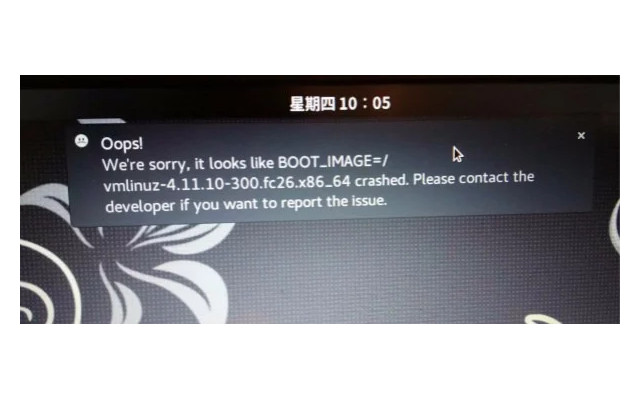
係統自定的似乎不夠用,
而網上建議的也只是3百MB左右,
到底現在的linux系統要點分配空間呢?
唔該。

作者: evantkh 時間: 2017-12-13 18:45
本帖最後由 evantkh 於 2017-12-13 18:46 編輯
我用RHEL,SSD容量係256GB,預設係:
1. /boot/efi(EFI partition包含grub2) : 210MB
2. /boot (包含Linux kernel): 1.1GB
作者: cal22cal 時間: 2017-12-13 22:51
正常嚟講,每個 kernel version 用大約 10M under /boot.
300M 應該係有凸,圖嘅 err msg 好似係有 oop/crash,
係 kernel 有問題,唔關 free space 事。

作者: chancho 時間: 2017-12-14 08:27
you have that problem in sept. still bothering you ?
作者: ckshum 時間: 2017-12-14 13:41
我用Ubuntu 16.04.3 LTS。60G SSD自動分割了500MB做/boot/efi,其餘係 /。 實際上,/boot/efi只用了4.7MB,而/boot用了120MB。
作者: ee9861 時間: 2017-12-14 15:40
/boot 500MB 內一定夠
作者: chimp 時間: 2017-12-14 15:42
提示: 作者被禁止或刪除 內容自動屏蔽
作者: KinChungE 時間: 2017-12-14 15:57
已有windows 8
partitions順序如下
[1GB recovery]
[260MB EFI system]
[C:]
[ 40GB unallocated]
[D:] ...
chimp 發表於 2017-12-14 15:42

佢唔會自動, 你要自己揀佢裝去邊
另外, 就算中間加插partition, 個recovery會仍然係D:
反如新加既partition先係E: F:.....
因為windows係按幾時第一次出現個partition黎分配letter, 唔係按第幾個partition
作者: chimp 時間: 2017-12-14 16:17
提示: 作者被禁止或刪除 內容自動屏蔽
作者: KinChungE 時間: 2017-12-14 16:39
自動的意思係當我揀咗嗰個unallocated space來裝,並且使用default settings(好似有?),佢就會在呢一塊un ...
chimp 發表於 2017-12-14 16:17
估計會係咁
/dev/sda1 = recovery
/dev/sda2 = EFI system
/dev/sda3 = C:
/dev/sda4 D出現後才出現,係E:
/dev/sda5 D出現後才出現,係F:
...
/dev/sda6 = D:
作者: evantkh 時間: 2017-12-14 22:31
Linux冇所謂嘅C drive、D drive等概念,純粹係你想mount去邊個directory。
我覺得如果唔清楚該distribution最好嘅裝法最好用unallocated space等installer自動去處理。
作者: chue 時間: 2017-12-14 23:36
已有windows 8
partitions順序如下
[1GB recovery]
[260MB EFI system]
[C:]
[ 40GB unallocated]
[D:] ...
chimp 發表於 2017-12-14 15:42
LINUXLITE 已可裝入 UEFI 主板既 PC?
作者: chimp 時間: 2017-12-15 00:39
提示: 作者被禁止或刪除 內容自動屏蔽
作者: chimp 時間: 2017-12-15 00:42
提示: 作者被禁止或刪除 內容自動屏蔽
作者: KinChungE 時間: 2017-12-15 09:52
回覆 KinChungE
咦,
只有win8 =>
加裝linux (win8 linux共存) =>
去除win8 =>
clean install wi ...
chimp 發表於 2017-12-15 00:39
產機後drive letter要assign過
因為drive letter係受registry影響
作者: finfin 時間: 2017-12-26 13:19
本帖最後由 finfin 於 2017-12-26 13:20 編輯
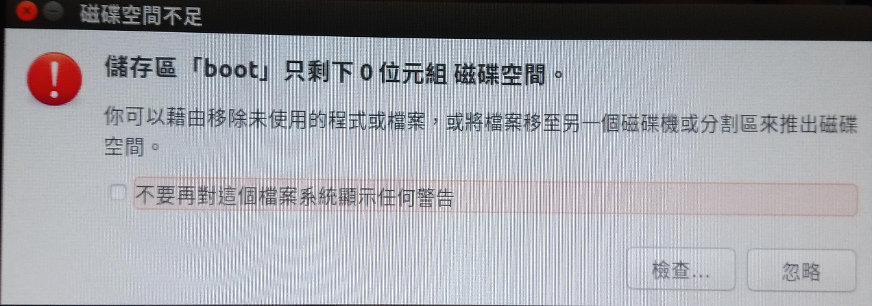
但係我又見到呢個警告,同樣都係由系統自己決定boot空間的。
[attach]2032479[/attach]
咁同下面呢樣係咪同一個問題引起?
作者: stly1015 時間: 2017-12-26 14:13
df -h

via HKEPC IR Pro v2.1.0 - iPhone
作者: 燒浩 時間: 2017-12-26 17:33
300MB夠用,但幾次Update後要清走舊 Kernel(apt 可行 apt autoremove 自動清除)。
圖中問題應該 Kernel 問題。如果幾次安裝都係咁,可能安裝碟有問題(我試過用CDBurnerXP燒pfSense,燒幾隻碟裝都係有問題;轉過另一隻Burner 再燒同一個Image 就安裝正常)
如果唔太熟,又多次安裝失敗,其實可以用佢自動分配嚟安裝,到熟咗再自己慢慢試。(其實裝多幾次就識)
作者: finfin 時間: 2017-12-28 01:01
本帖最後由 finfin 於 2017-12-28 01:03 編輯
300MB夠用,但幾次Update後要清走舊 Kernel(apt 可行 apt autoremove 自動清除)。
圖中問題應該 Kernel ...
燒浩 發表於 2017-12-26 17:33
但係佢又有話boot空間己是0呀. 。如下圖。
另外想問下 apt autoremove,
在終端機個完整指令是什麼呢?
唔該。
作者: chancho 時間: 2017-12-28 08:34
we can use
"cat /etc/fstab" to see how you divided you drive.
and "df -h" to see the usage of your partition.
may be you can post your result here.
also "sudo fdisk -l" will show how windows and linux share the drive(s)
作者: 燒浩 時間: 2017-12-28 10:12
但係佢又有話boot空間己是0呀. 。如下圖。
另外想問下 apt autoremove,
在終端機個完整指令是什麼呢? ...
finfin 發表於 2017-12-28 01:01 AM
apt autoremove 已是完整指令(如用 Ubuntu, Version 16.04 已大部份可用 apt 取代 apt-get, apt-cache...等指令,對 User 方便好多。因舊版本,分開幾個 commands 做唔同功能,如︰apt-get, apt-cache...)
你可以跟以上師兄講,「df -h」、「sudo fdisk -l」再post上嚟大家睇睇。
作者: finfin 時間: 2018-1-13 13:11
本帖最後由 finfin 於 2018-1-13 13:17 編輯
關於下面這部 fedora的
df -h
Filesystem Size Used Avail Use% Mounted on
devtmpfs 1.9G 0 1.9G 0% /dev
tmpfs 1.9G 18M 1.9G 1% /dev/shm
tmpfs 1.9G 2.0M 1.9G 1% /run
tmpfs 1.9G 0 1.9G 0% /sys/fs/cgroup
/dev/mapper/fedora-root 24G 11G 13G 46% /
tmpfs 1.9G 220K 1.9G 1% /tmp
/dev/mmcblk0p2 283M 163M 101M 62% /boot
/dev/mmcblk0p1 100M 9.5M 91M 10% /boot/efi
/dev/mapper/fedora-home 87G 20G 63G 25% /home
tmpfs 382M 20K 382M 1% /run/user/42
tmpfs 382M 5.8M 376M 2% /run/user/1000
sudo fdisk -l
Disk /dev/mmcblk0: 116.5 GiB, 125069950976 bytes, 244277248 sectors
Units: sectors of 1 * 512 = 512 bytes
Sector size (logical/physical): 512 bytes / 512 bytes
I/O size (minimum/optimal): 512 bytes / 512 bytes
Disklabel type: gpt
Disk identifier: 25EF9B5D-DAF9-45B8-AEFB-456AC52C995B
Device Start End Sectors Size Type
/dev/mmcblk0p1 2048 206847 204800 100M EFI System
/dev/mmcblk0p2 206848 821247 614400 300M Linux filesystem
/dev/mmcblk0p3 821248 244275199 243453952 116.1G Linux LVM
Disk /dev/mmcblk0boot1: 4 MiB, 4194304 bytes, 8192 sectors
Units: sectors of 1 * 512 = 512 bytes
Sector size (logical/physical): 512 bytes / 512 bytes
I/O size (minimum/optimal): 512 bytes / 512 bytes
Disk /dev/mmcblk0boot0: 4 MiB, 4194304 bytes, 8192 sectors
Units: sectors of 1 * 512 = 512 bytes
Sector size (logical/physical): 512 bytes / 512 bytes
I/O size (minimum/optimal): 512 bytes / 512 bytes
Disk /dev/mapper/fedora-root: 24.2 GiB, 26000490496 bytes, 50782208 sectors
Units: sectors of 1 * 512 = 512 bytes
Sector size (logical/physical): 512 bytes / 512 bytes
I/O size (minimum/optimal): 512 bytes / 512 bytes
Disk /dev/mapper/fedora-swap: 3.9 GiB, 4135583744 bytes, 8077312 sectors
Units: sectors of 1 * 512 = 512 bytes
Sector size (logical/physical): 512 bytes / 512 bytes
I/O size (minimum/optimal): 512 bytes / 512 bytes
Disk /dev/mapper/fedora-home: 88 GiB, 94501863424 bytes, 184573952 sectors
Units: sectors of 1 * 512 = 512 bytes
Sector size (logical/physical): 512 bytes / 512 bytes
I/O size (minimum/optimal): 512 bytes / 512 bytes
關於下面這部ubuntu的
df -h
檔案系統 Size 已用 Avail Use% 掛載點
udev 1.9G 0 1.9G 0% /dev
tmpfs 383M 6.5M 377M 2% /run
/dev/sdb1 26G 8.6G 16G 36% /
tmpfs 1.9G 8.0K 1.9G 1% /dev/shm
tmpfs 5.0M 4.0K 5.0M 1% /run/lock
tmpfs 1.9G 0 1.9G 0% /sys/fs/cgroup
/dev/loop0 84M 84M 0 100% /snap/core/3748
/dev/loop1 84M 84M 0 100% /snap/core/3440
/dev/loop2 84M 84M 0 100% /snap/core/3604
/dev/loop3 236M 236M 0 100% /snap/chromium/123
/dev/loop4 141M 141M 0 100% /snap/chromium/128
/dev/loop5 236M 236M 0 100% /snap/chromium/88
/dev/sdb7 84G 2.6G 78G 4% /home
/dev/sdb5 268M 260M 0 100% /boot
tmpfs 383M 148K 383M 1% /run/user/1000
sudo fdisk -l
Disk /dev/loop0: 83.8 MiB, 87863296 bytes, 171608 sectors
Units: sectors of 1 * 512 = 512 bytes
Sector size (logical/physical): 512 bytes / 512 bytes
I/O size (minimum/optimal): 512 bytes / 512 bytes
Disk /dev/loop1: 83.7 MiB, 87793664 bytes, 171472 sectors
Units: sectors of 1 * 512 = 512 bytes
Sector size (logical/physical): 512 bytes / 512 bytes
I/O size (minimum/optimal): 512 bytes / 512 bytes
Disk /dev/loop2: 83.8 MiB, 87896064 bytes, 171672 sectors
Units: sectors of 1 * 512 = 512 bytes
Sector size (logical/physical): 512 bytes / 512 bytes
I/O size (minimum/optimal): 512 bytes / 512 bytes
Disk /dev/loop3: 235.4 MiB, 246804480 bytes, 482040 sectors
Units: sectors of 1 * 512 = 512 bytes
Sector size (logical/physical): 512 bytes / 512 bytes
I/O size (minimum/optimal): 512 bytes / 512 bytes
Disk /dev/loop4: 140.9 MiB, 147763200 bytes, 288600 sectors
Units: sectors of 1 * 512 = 512 bytes
Sector size (logical/physical): 512 bytes / 512 bytes
I/O size (minimum/optimal): 512 bytes / 512 bytes
Disk /dev/loop5: 235.4 MiB, 246800384 bytes, 482032 sectors
Units: sectors of 1 * 512 = 512 bytes
Sector size (logical/physical): 512 bytes / 512 bytes
I/O size (minimum/optimal): 512 bytes / 512 bytes
Disk /dev/sda: 1.8 TiB, 2000398934016 bytes, 3907029168 sectors
Units: sectors of 1 * 512 = 512 bytes
Sector size (logical/physical): 512 bytes / 4096 bytes
I/O size (minimum/optimal): 4096 bytes / 4096 bytes
Disklabel type: dos
Disk identifier: 0xe115c18f
Device Boot Start End Sectors Size Id Type
/dev/sda1 * 2048 2048002047 2048000000 976.6G 7 HPFS/NTFS/exFAT
Disk /dev/sdb: 119.2 GiB, 128035676160 bytes, 250069680 sectors
Units: sectors of 1 * 512 = 512 bytes
Sector size (logical/physical): 512 bytes / 512 bytes
I/O size (minimum/optimal): 512 bytes / 512 bytes
Disklabel type: dos
Disk identifier: 0xd717cd65
Device Boot Start End Sectors Size Id Type
/dev/sdb1 * 2048 54687743 54685696 26.1G 83 Linux
/dev/sdb2 54689790 250068991 195379202 93.2G 5 Extended
/dev/sdb5 54689792 55273471 583680 285M 83 Linux
/dev/sdb6 55275520 70383615 15108096 7.2G 82 Linux swap / Solaris
/dev/sdb7 70385664 250068991 179683328 85.7G 83 Linux
唔該各位。
作者: chancho 時間: 2018-1-13 13:54
for ubuntu, can you show
du -h /boot
作者: finfin 時間: 2018-1-14 01:21
回覆 23# chancho
就是這樣了。唔該你。
du -h /boot
2.3M /boot/grub/fonts
2.0M /boot/grub/i386-pc
169K /boot/grub/locale
6.8M /boot/grub
du: cannot read directory '/boot/lost+found': Permission denied
12K /boot/lost+found
258M /boot
sudo du -h /boot
2.3M /boot/grub/fonts
2.0M /boot/grub/i386-pc
169K /boot/grub/locale
6.8M /boot/grub
12K /boot/lost+found
258M /boot
作者: chancho 時間: 2018-1-14 21:50
we are very close to the truth. please show result of
ls -lah /boot
作者: finfin 時間: 2018-1-15 11:24
本帖最後由 finfin 於 2018-1-15 11:31 編輯
apt autoremove 已是完整指令(如用 Ubuntu, Version 16.04 已大部份可用 apt 取代 apt-get, apt-c ...
燒浩 發表於 2017-12-28 10:12
about ubuntu
sudo apt autoremove
Reading package lists... Done
Building dependency tree
Reading state information... Done
You might want to run 'apt --fix-broken install' to correct these.
The following packages have unmet dependencies:
E: Unmet dependencies. Try 'apt --fix-broken install' with no packages (or specify a solution).
請問佢叫裝個是什麼東西呀?

作者: finfin 時間: 2018-1-15 11:35
we are very close to the truth. please show result of
ls -lah /boot
chancho 發表於 2018-1-14 21:50
首先想問下點分咩指令要用sudo,咩指令唔駛呢?
以下是fedora的
sudo ls -lah /boot
total 154M
dr-xr-xr-x. 6 root root 3.0K 1月 2 11:43 .
dr-xr-xr-x. 18 root root 4.0K 1月 2 11:41 ..
-rw-r--r--. 1 root root 188K 12月 9 04:50 config-4.14.4-200.fc26.x86_64
-rw-r--r--. 1 root root 188K 12月 14 23:53 config-4.14.6-200.fc26.x86_64
-rw-r--r--. 1 root root 188K 12月 21 03:26 config-4.14.8-200.fc26.x86_64
drwx------. 5 root root 16K 1月 1 1970 efi
-rw-r--r--. 1 root root 181K 2月 11 2017 elf-memtest86+-5.01
drwxr-xr-x. 2 root root 3.0K 12月 15 11:24 extlinux
drwxr-xr-x. 3 root root 1.0K 7月 14 2017 grub2
-rw-------. 1 root root 52M 6月 8 2017 initramfs-0-rescue-b6f4ede94ab14de082101035056184e0.img
-rw-------. 1 root root 21M 12月 15 11:26 initramfs-4.14.4-200.fc26.x86_64.img
-rw-------. 1 root root 21M 12月 26 04:59 initramfs-4.14.6-200.fc26.x86_64.img
-rw-------. 1 root root 21M 1月 2 11:43 initramfs-4.14.8-200.fc26.x86_64.img
drwx------. 2 root root 12K 6月 8 2017 lost+found
-rw-r--r--. 1 root root 179K 2月 11 2017 memtest86+-5.01
-rw-------. 1 root root 3.6M 12月 9 04:50 System.map-4.14.4-200.fc26.x86_64
-rw-------. 1 root root 3.6M 12月 14 23:53 System.map-4.14.6-200.fc26.x86_64
-rw-------. 1 root root 3.6M 12月 21 03:26 System.map-4.14.8-200.fc26.x86_64
-rwxr-xr-x. 1 root root 6.5M 6月 8 2017 vmlinuz-0-rescue-b6f4ede94ab14de082101035056184e0
-rwxr-xr-x. 1 root root 7.3M 12月 9 04:50 vmlinuz-4.14.4-200.fc26.x86_64
-rw-r--r--. 1 root root 167 12月 9 04:46 .vmlinuz-4.14.4-200.fc26.x86_64.hmac
-rwxr-xr-x. 1 root root 7.3M 12月 14 23:53 vmlinuz-4.14.6-200.fc26.x86_64
-rw-r--r--. 1 root root 167 12月 14 23:47 .vmlinuz-4.14.6-200.fc26.x86_64.hmac
-rwxr-xr-x. 1 root root 7.3M 12月 21 03:26 vmlinuz-4.14.8-200.fc26.x86_64
-rw-r--r--. 1 root root 167 12月 21 03:21 .vmlinuz-4.14.8-200.fc26.x86_64.hmac
作者: chancho 時間: 2018-1-15 14:30
your have installed (or upgraded) to0 many kernels. you either delete or uninstall all old kernels. you can check your current kernel version by
uname -a
作者: finfin 時間: 2018-1-16 01:58
your have installed (or upgraded) to0 many kernels. you either delete or uninstall all old kernels. ...
chancho 發表於 2018-1-15 14:30
請問你是講緊我部fedora還是ubuntu問題呀?
另外,系統唔會自動把舊的鏟走只會一直係度叫無空間的呀?
是係統自定boot空間的呀。
作者: chancho 時間: 2018-1-16 06:59
your ubuntu has 0% free space in boot. you should delete some old kernel files.
google search "ubuntu boot has no space".
作者: finfin 時間: 2018-1-19 02:46
your ubuntu has 0% free space in boot. you should delete some old kernel files.
google search "ubunt ...
chancho 發表於 2018-1-16 06:59
thanks a lot.
作者: finfin 時間: 2018-1-20 11:50
請問上面提及的 fedora 問題如何解決呢?
唔該。
作者: chancho 時間: 2018-1-20 14:38
fedora is using 4.15 kernel, do you still have that error ?
作者: chancho 時間: 2018-1-20 14:49
if you can not upgrade your kernel. that is how we do in archlinux.
by booting the installation disk of archlinux, chroot to the old system and do the upgrade (or anything to fix the system). may be you can do similar things to upgrade (or downgrade) fedora.
作者: finfin 時間: 2018-1-21 01:58
咁我索性重裝個新版算了。唔該晒。
作者: chancho 時間: 2018-1-21 06:42
https://forums.fedoraforum.org/s ... ve-image-and-chroot
this is an example of how to chroot a fedora and fix the grub2 installation. may be you can try before you reinstall your system.
作者: finfin 時間: 2018-1-22 12:06
this is an example of how to chroot a fedora and fix the grub2 installation. may be you can try bef ...
chancho 發表於 2018-1-21 06:42
好的,唔該。